How To: Install Apps and Games On iDEN Phones Using A Data Cable
Customers of any iDEN network can load apps and games to their phones using Motorola’s iDen Java Application Loader or iDenJAL. It’s a Windows program that lets you transfer Java apps and games from your PC to your phone. No network connection is required so iDenJAL works with any iDEN phone including ones on other networks like Canada’s Telus Mike, Nextel Mexico, MIRS in Israel, Nextel Brazil and Southen Linc in the US. iDenJAl is only for Java Apps and games. You can’t use it to install ringtones or wallpapers.
You can download iDenJAL from developer.motorola.com/docstools/idenjal/openJAL/. It’s part of Motorola’s developer site and you do need to register as a developer in order to download. Registration is free and only takes a few minutes. Downloading from Motorola insures that you have the latest version. But if you don’t want to wait you can download iDenJAL directly from here. The download is a .zip containing a single file, IdenJAL.exe. Extract the file and launch it to install Open WebJal.
You also need a data cable. These are available on the web from eBay, Amazon and many other vendors. I use iDenJAL on Windows XP. I heard reports of it not working on Vista or Windows 7 but haven’t tried it myself on the newer OSs. Hopefully Motorola will update it to work with the latest version of Windows.
iDenJAL is pretty easy to use. Connect the data cable to your PC and to the phone, which should be powered up and not running any Java programs. The first time you do this Windows will want to install some drivers, let it and if it tells you you need to reboot your PC do that too. Click the Connect To Phone menu item. I’ve found connection problems are rare with Open WebJAL. If you get the message “The phone is currently busy performing another operation…” it means that a Java application is still running on the phone. Go to the Java Menu on the phone and you’ll see the message “End all running applications”, choose Yes and then Finish and try connecting again. If you get “The application was unable to read the required phone information… ” disconnecting and reconnecting the cable usually helps.
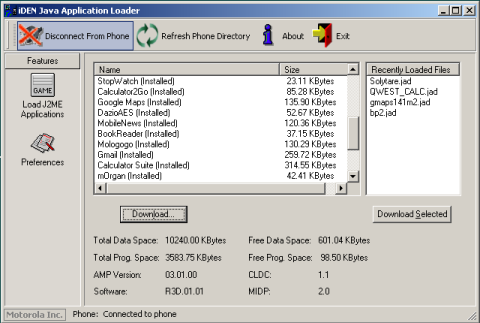
To load a game or application, press the download button and browse to the location where you have saved the .jad and .jar files, double click the .jad and WebJAL will copy the game or application to the phone. It’s as simple as that. Unlike with some phones both .jad and .jar are required. The part of jad and jar file names to the left of the period needs to be the same and no more than 11 characters long. For example:
Mini42.jad, Mini42.jar – Correct
Mini42.jad, Opera_Mini42.jar – Wrong, names don’t match
gmaps-232-m2_L1.jad, gmaps-232-m2_L1.jar – Wrong, left portion of the names is more than 11 characters long


Make the website a free downloading webpage then it will be the most popular website in the world
Can I Download Apps Without A Using load?
No, you need a load to download.