2010
01.13

Nimbuzz 1.5

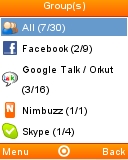
Here's the latest Nimbuzz,  version 1.5 full. The user interface has been completely redesigned compared to previous versions.  According to Nimbuzz, the new features in 1.5 are:

  • Direct access to active chats and chatrooms from the top of  your buddylist
  • Chat previews in the buddylist – easily see what’s going on and monitor multiple chats
  • Fast switching between buddylist and chats/chatrooms
  • Save space on your screen – chose to view one group at the time
  • Quick Navigation to the top or the bottom of your buddylist using right and left navigation keys
  • Separate menu icon for settings
  • New sounds for chats and messages
  • Improved stability and performance

Supported networks are the same as in version 1.1, Windows Live Messenger,  Skype, Yahoo, Facebook,  Google Talk/Orkut, AIM, MySpace, ICQ, Twitter, Giovani, studiVZ, shuelerVZ, Gadu-Gadu and Hyves.

As seems to be the case with many apps on iDEN phones, the OK button and the soft keys are mapped incorrectly.  I's not that hard to compensate if you remember to:

1. Use the green "Call" key as the "OK" key
2. Use the right soft key for the left soft key's action
3. Use the menu key for the  right soft key's action
4. Exception : When entering text in native pop up windows,  the soft keys (labeled OK and Cancel) work as labeled.

Type: Freeware
Vendor: Nimbuzz - Product Page, Online Help, Forum
Data Connection Required: Yes
Supported iDEN phones: All Falcon Series (i776, i465, i9, i290, etc.

(Nextel and Boost Mobile iDEN phones only).

Alternate links for side loading and non-iDEN devices: ZIP JAD JAR

20 comments so far

Add Your Comment
  1. [...] networks are the same as in version 1.5, Windows Live Messenger,  Skype, Yahoo, Facebook,  Google Talk, AIM, MySpace, ICQ, Twitter, [...]

  2. hey my fb contact do no show up on numbuzz.... but everything else works... a lil help..

    • Dommo, I've noticed that Facebbok and Nimbuzz don't work to togetther very well. Facebook friends names only seem to appear when they are online, the rest of the time a number shows instead of a name. I don't think there is any fix for that it's just the way it is.

  3. i cant get myspace to work on nimbuzz 1.5 any way to get it to work

    • Nimbuzz says this about using MySpace:

      "Nimbuzz connects to MySpace Chat Application.
      You need to be enabled for chat on MySpace chat application to be able to chat on Nimbuzz, and you need also to have accepted your MySpace friends on the chat application to be able to see and chat with them on Nimbuzz."

      Hope that helps, I don't use MySpace so I can't confirm any of it. If you are still having problems with Nimbuzz try asking for help on the Nimbuzz forum : http://forum.nimbuzz.com/

  4. Nimbuzz and everything else on this site is free to download. If you aren't using Boost Mobile your operator may charge you for data used, however.

  5. is it free?

  6. If I have Windows messenger and gtalk open, is it possible to sign out from one of them only?
    How do you sign out without closing Nimbuzz anyway? Thanks.

  7. oh, cool , that makes sense, i have them all writen down i should have noticed the corolation... thanks for the info

  8. I don't have one but I've heard that on the i465, a long press on the Fn key switches the keyboard to a funky virtual phone keypad mode where you triple tap using only 0 - 9 , * and #. So "R" is the 2, a, b, c key, "t" is 3, d, e, f etc.

    In that mode pressing the menu key one or twice should give you number and symbol mode options as well.

  9. well, i figured out if i hit function(Fn) before some of the letters it gives me a letter, but its assigned wrong, btw, i have a full qwerty keyboard. so for example if i hit "(Fn)R" i get the letter "a". only 8 of them work, the rest still give me Zeros

  10. i think i know what beth is talking about, when your signing up, it asks you for the verification code, to make sure your not a robot. when i try to do it, no matter what i hit only zeros come up instead of the letters. so it says something about the wrong code.

  11. Beth, I don't understand your question. What image?

  12. how the heck do you enter the characters from the image on a i 465

  13. Check out this page: http://www.getjar.com/mobile/25870/nefanasa-yahoo---new-ym-9-protocol-for-motorola-i465-clutch/ ..Nefanasa Yahoo IM App.. a straight forward login app... This version didn't work for my i465 though.. I had to download the certificated version ( http://nefanasa.com/yahoo/index.php?do=download ) and go into settings and change the server address to cn.scs.msg.yahoo.com .. now it works fine! I have just downloaded it and have not found any glitches or problems.. but the qwerty layout works and all the keys are mapped correctly.. and you can go in and choose another key layout if yours is not supported by the default one! Plz try this out and post it Dennis..

  14. i cant get the myspace to work on mine

  15. Works but took upwards of 5 minutes to connect the first time, it connects faster on my i465 than the old nimbuzz full but not as fast as the old lite version. The time is spent mostly downloading the contact list it would seem, over a minute. If it drops the connection it takes a long long time to reconnect almost impractical.

  16. had 2 go on line 2 create a new account. soft keys R opposite of each other
    on my i776 but i also have the download upgrade on my phone

  17. i download this and i cant get it to connect when i try to create a new account

  18. cool thanks for the help.... i guess... im going back to im buddy... but i like the Nimbuzz was alot faster and it gave a notification when i got a message....