11.06
With over 57,000 freely distributed Java applications available, I'll never be able to download, test, package, write up and post all of them.
You don't have to wait for me to post your favorite game or app. This tutorial shows you how to load Java applications on Boost iDEN and Nextel phones using Sprint/Nextel's ADP iDEN Content Uploader, which is a web based developer tool. This method does not require a data cable but it only works with phones on Boost Mobile or Nextel USA and requires access to a PC.
These instructions are based on using Windows XP because that's what I have. As far as I know, everything should work the same on Vista or Windows 7. Users of other operating systems will have to find alternative programs for creating .JAD and .ZIP files but otherwise the process should be the same.
- Find the game or app you want to load and download it. The best selection of free legal mobile games seems to be at GetJar.com. Other good download sites include Mobango.com Phoload.com, midlet-review.com and Mobilerated.com. Many more can be found using Google.
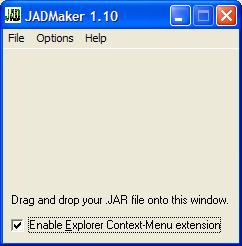
- A Java game or app consists of two files; .JAR and .JAD. The JAR (Java ARchive) is the actual executable file. The JAD (Java Application Descriptor) is a text file describing the JAR's characteristics. iDEN phones require both files in order to install. Some sites, including Getjar, only provide the .JAR, but the .JAD is easy to create using a program called JADMaker.
- If you already have both the .JAR and .JAD files skip to the next step. If you only have the .JAR file - download JADMaker.zip. Unzip the contents into a folder and then run JADMaker.exe by double-clicking it in Windows Explorer. Still in Windows Explorer, navigate to the folder with the .JAR file and drag it into JADMaker, which will to create the .JAD in the same directory as the .JAR.
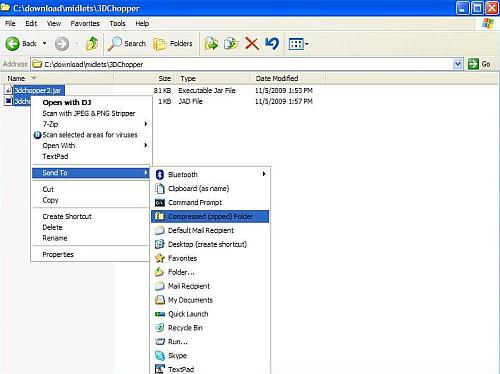
- Create a .zip file containing the .jar and .jad. There are many programs that can create .ZIP files. I get good results using the ZIP file utility that is built into Windows XP, Vista and 7. To use it highlight both files by holding Ctrl and clicking them. Then right-click the selected files and choose Send to and then Compressed (zipped) folder (image above). If you get a dialog box asking you to "Designate Compressed (zipped) folders as the application for handling ZIP files?", click "Yes"

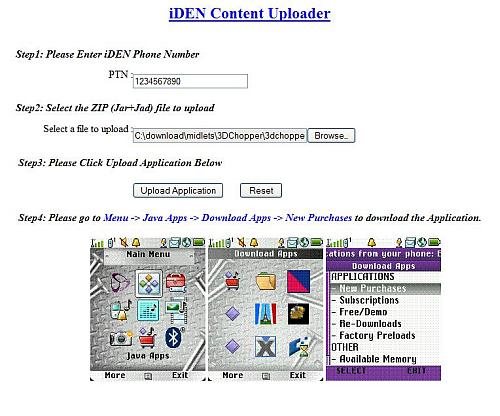
- Open the ADP iDEN Content Uploader at http://144.230.114.35/adp1/FUN/index.jsp (image above).
- Enter your Boost or Nextel mobile phone number in the field labeled PTN:
- Click the Browse button and navigate to the folder where you created your ZIP file.
- Click the ZIP file and then click "Open"
- Click the Upload button
- The rest of the process is the same as if you sent the app to your phone from BoostApps;
- Press the phone's Menu button.

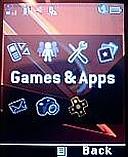
In the menu, highlight Games & Apps (called Java Apps on some phones) and press OK.
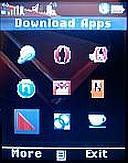
In the Games & Apps Menu, highlight Download Apps and press OK.
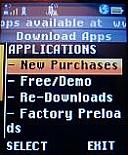
In the Download Apps Menu, select New Purchases and press OK.
- Scroll down and select your new game or app, they are listed in alphabetical order. Press OK and on the next screen click the left soft key labeled "Get It" and the download will start.
- When the download finishes, close Download Apps and your will be prompted to install the new game or application.
- If the installation was successful you will see the new game or app in you Java menu. Try running it.
Sounds easy, right?. Well it is except that it doesn't work over half the time. Lots of things can go wrong. Here are some of the problems and what you can do about them.
- When you go to new purchases, your new game or app isn't there. The most likely cause is that you entered your phone number incorrectly. Try again and remember to enter the number with no dashes or spaces, just ten numbers starting with the area code. Do not put a "1" in front of the number. There also seem to be a small number of phones that both BoostApps and the ADP iDEN Content Uploader just don't work with. Its probably a provisioning error by Boost, but as neither BoostApps or the Content Uploader are supported by Boost calling customer support is unlikely to help. I'm sorry but I don't have a solution if this happens to you.
- "Failed Download with status code:904 (Attribute Mismatch) Please Retry" at the start of the download - This is very common. It seems to be a bug in the Content Uploader. The solution is simple. Rename the zip file and upload it again. It doesn't really seem to matter what you rename it to. I usually just add or remove a letter from the file name. In a few cases I've had to rename the file a couple of times before it would work.
- "JAR file mismatch" while installing - this is an error in the JAD file. It should never happen if you use JadMaker but seems fairly common with downloaded JADs. To fix it, delete the JAD and ZIP and use JadMaker to create a new JAD. Then make a new ZIP and upload again.
- "Java Error" while installing. When this happens, find the new app in the Java Apps menu. It will have a generic looking icon with an X or downward pointing arrow on it. Select the app and press "OK". It will start installing again only this time it will list the steps of the install on the screen. Wait for it to fail and then take note of which which step it failed on:
If the error occurs during the "Loading Classes" or "Validating classes" part of the install it means that the app is not compatible with your phone and will never work. I find that only about half of the generic Java apps that I try actually work on iDEN phones.
If the error occurs during the "Allocating Flash" or "Writing Flash" install phase, it means you don't have enough free space on the phone. Delete one or more other apps or games and restart the install on the phone. To delete an app, select it in the menu, press the "Menu" key and choose "Deinstall".
Good luck finding and installing games and apps. Let us know in the comments of your successes and failures. If you find a particularly good, freely distributable game or app let me know so I can add it to BoostApps.
I just read something from Cornell dealing with an i856 phone and the problem with not being able to get a ringtone from a YouTube site.... I apologize if this has already been suggested (..since I stopped reading and flew down to here...).. I have an i856w on Boost Network $1 chat plan (I mention that only because I get a weird feeling that depending on your payment plan Pay-As-U-Go, Unlimited or $1dayChat all can determine your use or NOT, as is the apps from the Sprint Network with the same phone allows features Boost doesn't have).. Okay back to my point, G3 is to iDEN like pc apps are on a MAC!!! But i love the "Laughing Cat" and did all i could to find a way to send it to my phone!!!! What was I thinking????
We have a voice recorder on this dang phone!!!! Put your phone by your speaker and record it!!!! On menu there is an option to save it a "ringtone" WWWWaaaaaLLLLLaaaa !!!! Take Care!
yea i was curios 2 c if i culd do it i picked out this game and its in my downloads folder
i got the jadmaker so i open it and drag my game to jadmakers window and there was an error & idk how 2 unzip jadmaker and i even tried opening its application extention wich is unzip 32 dll and wen i drag my game into jadmakr it says run time error 53 can anyboby tell me wat i did wrong and explain plz
Piggy, If you are on Windows, right click the jadmaker.zip file and choose "Open With" and then "Compressed Zipped folders". A folder will open with four files, drag or copy all of them to a new folder. Then double click JadMaker.exe in that folder to launch JadMaker. Drag the jar file into JadMaker which will generate a new jad file in the folder where the jar file lives.
I don't know anything about Macs so if you use one your going to have to ask an Apple guru how to extract zip files.
Wow Dennis I just downloaded my first application on my i9. It is a spytooth application http://www.sharejar.com/software_id.php?id=695. I don't know what I can use it for but it's fully functional. So now that I have the method I just have to find which apps offer both jar and jad files to work. Thanks bro!
Dennis! Good day to you my friend. Thank you btw for this great site... it's very helpful and your support is very much appreciated. I have followed all the instructions in your tutorial and have a few questions. If IDEN phones require both .jar and a .jad files for applications to work, how would making a .jad file from an existing .jar file be effective if it's essentially the same data? You mentioned that .jad files describe the .jar characteristics so how could a converted .jar file be any different? My other question is that the IDEN JAL program only recognizes .jad application files to download. How am I to get a .jar file written onto my i9 using the IDEN JAL program if it doesn't identify it in on my flash drive? I mananged to get an application written onto my phone by this method but it didn't open. The icon was there but it just goes back into the Java apps menu. So I tried making a zip file and sending it using the ADP IDEN Content Uploader and it was successful in sending the application but it didn't open as well. In IDEN JAL, the application was listed as uninstalled; what does that mean? I will keep making attempts with other applications and will let you know if I am successful installing any apps. Thanks a mil Den!!
[...] you have a PC you can easily send any game or app to your phone following the instructions here: How To: Load (Almost) Any Game or App On Boost and Nextel. If you find something that works and is good please share your successes with a comment here and [...]
Nice. I got the micro usb cable today.
And I was able to transfer apps to my phone.
So far all the app i download from boostapp work.
Yes!!!!!!
Goodbye number only memo and welcome Java
I have tried getting several apps this way and they fail off getjar I follow the exact way to make the jar and jad file with the jad maker to create the morse code app and the flag reader app as well the cocktail app and
Lots of things on GetJar don't work. Keep trying you will eventually find one that does.
Thanks Dennis, I'll get a cable Monday and let you know what I find out. My new Bluetooth dongle sure would have been nice to dl, but you can't win them all. I haven't given up yet.
I haven't get the usb cable yet but I will try.
Thank Dennis.
I continue receiving 'file type' error while attempting to load via Bluetooth. I make it to the download end and screen pops up with error. File is 20 seconds @8000, and 32 in Mp3 format.
File plays on computer but never makes it to the i465. I'm sure it is something simple that I am failing to do.
i465 doesn't play mp3. You have to convert it to a WAV file.
The i465 should be able to play MP3s once they are converted to the proper format (Bit Rate: 32 kbps; Sample Rate: 8 000 Hz; Monaural). I believe that several of the ringtones that come with the i465 are mp3s. You can use wav's but mp3's have a smaller file size for the same quality.
For conversion instructions see: How To: Use Any MP3 File As A Free Ringtone
Ringtones no. For that you have to use bluetooth or else a cable with some really janky software. See How To: Use Any MP3 File As A Free Ringtone for information on the Bluetooth method
Will this also upload ringtones?
Enspec, You can load apps using a USB cable and a free app from Motorola called iDEN JAL. See http://wapreview.com/blog/?page_id=207 for links and instructions.
Is there any way get apps on to the phone through sd card or usb cable?
(been staring at the download apps for 5 hours already)
Will i am pretty sure that I enter my phone number right and so far i can't receive any file from this site.
Maybe i am just the lucky one that can't download from this site?
Enspec, downloading is still working for me. When you enter your phone use 10 numbers only, no spaces, dashes or dots and no leading "1".
The lock icon is normal.
Rick, the only way to clear the new purchases list is by downloading an item.
My phone, without my help, just started getting hit with all files from this site an hour after giving up. I suppose it takes time for Boost to add on services to new customers.
Thanks for the response. Now, if I can figure out how to transfer my personal ring-tones.
I installed the apps I wanted deleted the ones I did NOT but how do you clear the list of files pending?
Looks like the boost have lock down the center? Because i can't sent the file to my i856w. It doesn't even show in the new purchases.
Followed the tut and every time It reports on the phone that 'no new purchases identified'. Oh, does the little lock icon in the upper left corner of the upload screen prevent my receiving programs.
Midlet-Review used to have a bunch of free games at http://www.midlet-review.com/index?content=freegames/freegames with download links but they are gone now. I can't find anything but paid games now. Did you find a free game on Midlet-review? What's the page URL?
how to you get to the downloads on midlet-review.com? i cant find it for the games
Finally somthing for my boost mobile phone Motorola clutch THANKS
The download should appear immediately in Download Apps > New Purchases. If it doesn't try again and double check the phone number. You MUST enter the number as ten digits ONLY, 1111111111, NOT 111-111-1111
how long does it take? ill still try it
I tried "We Travel". It loads but hangs on the start up screen.
Walter, we travel midlet suite looks interesting. It might work on iDEN phones. The only way to find out is to try it. Let us know if you do.
dennis... theres a navigation app on getjar called "we travelmidlet suite" i dont know if you ever seen it ,but i was wondering do you think i can download it on my clutch using this tutorial . the app seems decent . let me know thanx!
russell, The apps you loaded probably aren't compatible with your phone.
they go to my phone download fine but when i try to use them they say loading whatever im trying to use and then nothing whats wrong?
oh okay cool than
I'm OK cornell. If I sound exasperated it's because I've answered the YouTube, video streaming question over and over in comments on various posts.
dang man you good? you sounded frustrated i just wanted some answers man thats all. i mean to make u frustrated or anything
Sigh, You can't use YouTube on any iDEN phone because the network is too slow for streaming video. Bolt doesn't doesn't work, the YouTube app on GetJar doesn't work, nothing works because it's technically impossible. For video streaming you need a 3G phone and there is no iDEN 3G.
thats the one. so does it work for u? and on bolt 1.6 full version, i cant get the youtube or any other videos to work. i did the wizard thing and all the steps but it just wont let me watch videos. i even look at the help menu and i still couldnt get it to work. could u try it on your phone and if you get it to work send me what you did to my email address? am also really shcoked that on my i856 the default web browser m.youtube.com wouldnt work u would think it would work because of the phones abilities but it doesnt. Also on my opera 4 i cant watch videos either. u dnt have to respond to this but it would help. THANKS MAN
cornell, If you mean this YouTube app, http://www.getjar.com/mobile/16671/youtube-web-for-motorola-i576/
It's a just a Web shortcut that is supposed to launch the browser and open http://m.youtube.com Motorola iDEN phones don't support Web shortcuts.
i got it to upload thanks. how come youtube on getjar dosent work on my i856 phone???
Those iDen Content Uploader error codes starting with 100 don't seem to be documented anywhere. I have no idea what 1004 means.
Try renaming the zip file and resending. If it keeps failing recreate the zip file following the instructions exactly and try again
Also, iDEN Content Uploader only works with Java apps (.JAR + .JAD). If you are trying to upload a ringtone it will never work.
i got a error code on idencontentuploader website it says Application Assignment Failed With Error Code: 1005. what does this mean did i do something wrong?
Not every game and app is compatible with iDEN phones. As for Cell Spy Pro, I believe it is a scam. Most of what they claim it can do is technically impossible. See http://www.ripoffreport.com/Search/Company/Cell-Spy.aspx
I DOWNLOADED CELL SPY PRO...AND CANT ADD IT TO MY PHONE(I9) PLEASE HELP ME THANKS....
I NEED A MUSIC PLAYER FOR MY 1465 CLUTCH
Jay, AFAIK there is no way to remove failed downloads from the recent purchases list. I have a about 100 in mine going back several years. It doesn't seen to cause any problems and the list is in alphabetical order so finding things in that mess is not too hard.
How do you erase items on the New Purchases list. I have some games that failed to download and are stuck on the list. I have an i9. Great tutorial. Thanks!
Thanks Dude. I just downloaded the Bolt Lite Browser using the Jadmaker info you provided. It was easy. Okay, It took me a few shots, but your info got me there.
I used the Bolt Lite file from Getjar. The Jadmaker, and my data cable hooked up to the Motorola Iden Java App.
I have the opera mini 4, and bolt lite on my phone.
yes thank you it dose work very well its just hard to know which app work with my phone lol
...¿!? ...its a free service ???
taken from the boost site and this worked for me
I just purchased a game/application on my phone and can't install it. What can I do?
Monthly Unlimited, Daily Chat & Text, Pay As You Go: Please go to "My Info" from your phone's main menu and make sure your Boost telephone number is listed under line 1. If not, please enter your Boost Mobile® number and try to re-download the game or application. You can also try going to Java®Apps > Download Apps > select New Purchases or Re-Downloads.
Thanks, been waiting for this one. Turns out I was doing it correctly, I just chose games that weren't compatible with my phone. Keep up the great work.
excelent tut. finally something explained to me about the 409 error
Thank you for this. You just showed me how to get the most out of my phone for free. Thank You, Thank You, Thank You !!!!!